
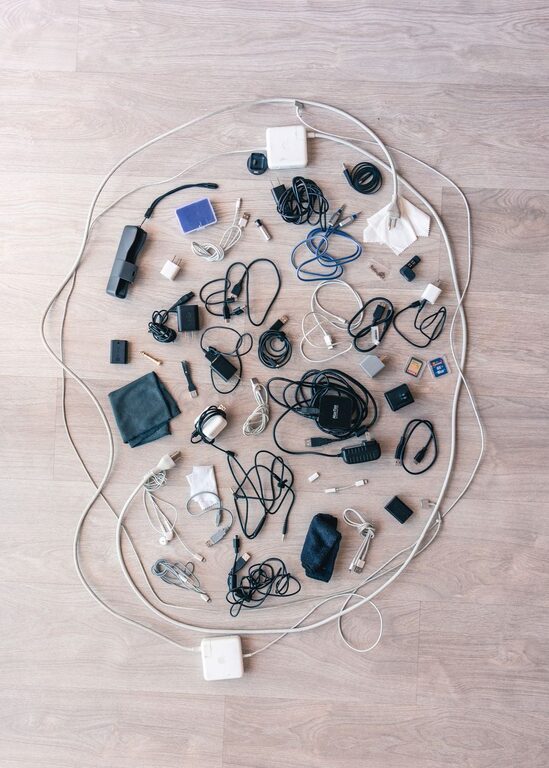
Cables and chargers are useful, but they can quickly turn into a tangled pile. Different devices often need different cords, and extra cables tend to collect in drawers, bags, and desk corners. With a simple system, you can keep everything easy to find, prevent damage, and make your space look much neater.
The best approach combines three steps: remove what you do not need, group similar items, and create a storage system that is easy to maintain.
Start With a Cable Cleanout
Before buying organizers, gather all your cables and chargers in one place. Check your desk, bedside table, kitchen drawers, travel bags, and storage bins. Seeing everything together makes it easier to understand what you actually have.
Spread the items out on a table or clean floor. Then sort them into a few basic groups:
– Phone and tablet chargers
– Computer and monitor cables
– Audio and video cables
– Power cords and extension cables
– Camera, game, or hobby cables
– Unknown or unused cables
Inspect each item as you sort it. Look for frayed coverings, bent connectors, loose plugs, or signs of heat damage. Set aside anything that appears unsafe or no longer works. Do not keep a cable simply because it might be useful someday if you cannot identify it or remember what it belongs to.
Match Cables With Devices
If you are unsure about a cable, test it with the device it may belong to. You can also check the connector shape and any printed markings. Place each cable beside its device, adapter, or charger when possible.
For cables without a clear purpose, create a small “check later” group. Give yourself a deadline, such as 30 days. If you do not identify or use them by then, remove them from your collection.
Group Items by Use
Once you have removed damaged and unnecessary items, organize the remaining cables by function. Grouping makes it faster to choose the right cord when you need it.
Useful categories include:
– Daily-use charging cables
– Work-from-home cables
– Travel cables
– Backup or spare cables
– Device-specific cables
– Longer cables for occasional use
You can also organize cables by location. For example, keep one set at your desk, another near your bed, and a travel set in your bag. This prevents you from carrying the same cables from room to room.
Avoid creating too many categories. A system with only a few clear groups is easier to remember and maintain.
Label Cables Clearly
Labels are especially helpful when several cables look alike. A small label can save time and prevent you from unplugging the wrong item.
Write a short description, such as:
– Phone charger
– Laptop power
– Monitor cable
– Camera cable
– Travel backup
You can use cable labels, small pieces of masking tape, or reusable tags. Place the label near one end of the cable so it remains visible when the cord is stored or connected.
For chargers with removable cables, label both the power adapter and the matching cord. This helps you quickly identify which pieces belong together.
Color coding is another simple option. Assign one color to each area or purpose. For example, blue could mean work equipment, green could mean travel, and yellow could mean entertainment devices. Use colored bands, tape, or small clips to create the system.
Choose Storage That Fits Your Routine
The right storage method depends on how often you use each cable. Items used every day should be easy to reach, while occasional cables can be stored farther away.
Use a Small Tray for Daily Cables
A tray or shallow basket can keep frequently used chargers under control. Place it on or beside your desk, nightstand, or kitchen counter. Add a few cable clips to stop cords from sliding behind furniture.
Keep only the cables you use regularly in this space. If the tray becomes crowded, move rarely used items to another location.
Use Dividers for Drawers
A drawer with compartments works well for smaller cables, adapters, and charging blocks. Use drawer dividers, small boxes, or removable containers to create sections.
Try giving each section a purpose, such as:
– Short charging cables
– Long charging cables
– Adapters
– Memory card accessories
– Audio cables
Avoid placing loose cables on top of one another. Dividers reduce tangles and make every item easier to see.
Use Pouches for Travel
Cable pouches are useful for travel, work, and everyday carrying. Choose a pouch with several compartments so chargers, cables, and small adapters do not become one tangled bundle.
Keep a ready-to-go travel kit with the essentials you normally use. This may include a charging block, one or two cables, earbuds, and a compact adapter. Refill the kit after each trip so it is ready for the next one.
Store Long Cables Separately
Long extension cords, computer cables, and entertainment-system cords need more space. Coil them loosely and secure them with reusable hook-and-loop straps. Store them in a labeled bin or basket.
Do not wrap cables tightly around chargers or bend them sharply. Tight bends can stress the cable near the connector and shorten its useful life.
Coil Cables the Right Way
A neat coil is easier to store and less likely to become damaged. Start by holding one end of the cable, then create even loops without pulling tightly. Secure the center or outside of the coil with a reusable strap.
For some cables, an over-under coiling method helps reduce twisting. Alternate the direction of each loop instead of winding the cable in the same direction every time. This is especially useful for longer cords.
Avoid using tight knots, rubber bands, or tape that leaves sticky residue. These methods can put unnecessary pressure on the cable or make it difficult to use later.
Manage Cables at Your Desk
A tidy desk setup needs more than organized storage. It also needs a way to control cables while devices are plugged in.
Use adhesive clips or a cable management tray to guide cords along the back or underside of your desk. Keep power strips off the floor when practical, and label the plugs so you know which device each one supports.
Leave a little slack near each device. Cables that are stretched tightly can pull on ports and connectors. At the same time, avoid leaving large loops on the floor where they can catch on feet or chair wheels.
Bundle cables that run in the same direction, but keep different types separate when necessary. For example, you may want to keep audio and video cables away from bulky power cords to make troubleshooting easier.
Create a Simple Maintenance Routine
Cable organization works best when it becomes a habit. Once a month, take a few minutes to return loose items to their proper storage locations. Remove cables that are damaged or no longer useful.
When you buy a new device, decide where its cable will live before opening another drawer. If the device replaces an older one, compare the old accessories and remove duplicates you no longer need.
A useful rule is to keep one reliable spare for important devices, rather than collecting many extras. Store spare cables in a separate, clearly labeled section so they do not mix with daily-use items.
Final Tips for a Tidy System
A good cable system should be simple, visible, and easy to use. Keep your most-used chargers close by, label anything that looks similar, and store occasional cables in dedicated containers.
You do not need expensive equipment to get started. A few labels, reusable straps, small boxes, and a drawer or basket can make a major difference. By sorting cables regularly and giving every item a clear home, you can reduce clutter and find the right charger without searching through a tangled pile.

Related Posts